Showing posts with label eon. Show all posts

Friday, February 22, 2013

EON NAS Expansion and upgrade

EON NAS has served me well for a few years, but I am out of space. Also considering to upgrade EON, and perhaps ZPOOL and ZFS versions (options such as block-level deduplication are appealing, as it makes it easy to bulk backup tons of old disks which are largely older versions of my current repo, without worrying about wasting space by having the same file many times)

First order of business: expand from 9x2TB to 9x4TB drives.  Following refs such as:

http://www.itsacon.net/computers/unix/growing-a-zfs-pool/

I first check that all my drives are currently alive, the system is fully silvered, and then scrub to make doubly sure there are no errors.

My pool is raidz2, so in theory I could replace two disks at once, but obviously that leaves me vulnerable. Having dual parity allows me to swap one disk at a time, and still be protected again a disk failure mid-upgrade!

Start with "zpool status", which shows mediapool totally healthy.

"zpool scrub mediapool"

Says it'll take 50 hours to complete. Well, we wouldn't have gone out of our way to use ZFS unless we were paranoid about our data, so we'll suck it up and wait it out.

Okay, scrub completed successfully. Shut down, remove one of the 2TB drives and replace it with a 4TB drive. Verify at boot that the BIOS sees the 4TB drive.


media:1:~#zpool status
  pool: mediapool
 state: DEGRADED
status: One or more devices could not be opened.  Sufficient replicas exist for
        the pool to continue functioning in a degraded state.
action: Attach the missing device and online it using 'zpool online'.
   see: http://www.sun.com/msg/ZFS-8000-2Q
 scrub: none requested
config:

        NAME                    STATE     READ WRITE CKSUM
        mediapool               DEGRADED     0     0     0
          raidz2-0              DEGRADED     0     0     0
            c0t0d0              ONLINE       0     0     0
            c0t1d0              ONLINE       0     0     0
            c2t2d0              ONLINE       0     0     0
            c2t3d0              ONLINE       0     0     0
            c3t0d0              ONLINE       0     0     0
            c3t1d0              ONLINE       0     0     0
            c3t2d0              ONLINE       0     0     0
            c3t3d0              ONLINE       0     0     0
            390014080793031528  UNAVAIL      0     0     0  was /dev/dsk/c3t4d0s0

errors: No known data errors

#zpool replace mediapool c3t4d0s0
cannot open '/dev/dsk/c3t4d0s0': I/O error

cfgadm -s "select=type(disk)"
Ap_Id                          Type         Receptacle   Occupant     Condition
sata0/0::dsk/c3t0d0            disk         connected    configured   ok
sata0/1::dsk/c3t1d0            disk         connected    configured   ok
sata0/2::dsk/c3t2d0            disk         connected    configured   ok
sata0/3::dsk/c3t3d0            disk         connected    configured   ok
sata0/4::dsk/c3t4d0            disk         connected    configured   ok
sata1/0::dsk/c0t0d0            disk         connected    configured   ok
sata1/1::dsk/c0t1d0            disk         connected    configured   ok
sata2/2::dsk/c2t2d0            disk         connected    configured   ok
sata2/3::dsk/c2t3d0            disk         connected    configured   ok

So, the system sees c3t4d0. So then s0 does not exist probably. I can either replace with p0 to use the entire partition, or do a format to single slice and use s0. I don't recall why I used s0 before... probably so that I could upgrade some of the drives with larger ones with matching s0, then use s1 for extra space. Should be possible even with p0. Need to check my records.

Wait, that's not right. zpool replace should take a raw disk, format it, and resilver (according to http://docs.oracle.com/cd/E19082-01/817-2271/gbcet/index.html)

#zpool replace mediapool c3t4d0
cannot replace c3t4d0 with c3t4d0: device is too small

#format
Searching for disks...done


AVAILABLE DISK SELECTIONS:
       0. c0t0d0
          /pci@0,0/pci8086,3a46@1c,3/pci1458,b000@0/disk@0,0
       1. c0t1d0
          /pci@0,0/pci8086,3a46@1c,3/pci1458,b000@0/disk@1,0
       2. c1d0
          /pci@0,0/pci8086,244e@1e/pci-ide@0/ide@0/cmdk@0,0
       3. c2t2d0
          /pci@0,0/pci8086,244e@1e/pci1095,7124@1/disk@2,0
       4. c2t3d0
          /pci@0,0/pci8086,244e@1e/pci1095,7124@1/disk@3,0
       5. c3t0d0
          /pci@0,0/pci1458,b005@1f,2/disk@0,0
       6. c3t1d0
          /pci@0,0/pci1458,b005@1f,2/disk@1,0
       7. c3t2d0
          /pci@0,0/pci1458,b005@1f,2/disk@2,0
       8. c3t3d0
          /pci@0,0/pci1458,b005@1f,2/disk@3,0
       9. c3t4d0
          /pci@0,0/pci1458,b005@1f,2/disk@4,0

There's the problem; my drive, which shows up as 4000GB to BIOS, shows up as 1.64 TB within EON Solaris. Why? Poking around the net, it should be


It is an odd point that the perceived size is exactly 2TB less than the actual size. I'm running 64-bit solaris. The BIOS reports the drive as 4TB (need to double-check this is currently the case, as I tried a few different slots trying to get it to work)

Answer: although I was not able to find documentation of this, early versions of EON did not have support for 3TB+ drives completely in place. Need to update to recent version.

After updating to EON version 1.0b,


media:1:~#format
Searching for disks...done

AVAILABLE DISK SELECTIONS:
       0. c0t0d0
          /pci@0,0/pci8086,3a46@1c,3/pci1458,b000@0/disk@0,0

The drive's correct size is seen.

Check pool status


media:2:~#zpool status
  pool: mediapool
 state: DEGRADED
status: One or more devices could not be used because the label is missing or
        invalid.  Sufficient replicas exist for the pool to continue
        functioning in a degraded state.
action: Replace the device using 'zpool replace'.
   see: http://www.sun.com/msg/ZFS-8000-4J
  scan: none requested
config:

        NAME                      STATE     READ WRITE CKSUM
        mediapool                 DEGRADED     0     0     0
          raidz2-0                DEGRADED     0     0     0
            14963257236115845187  UNAVAIL      0     0     0  was /dev/dsk/c0t0d0s0
            c0t1d0                ONLINE       0     0     0
            c4t2d0                ONLINE       0     0     0
            c4t3d0                ONLINE       0     0     0
            c5t0d0                ONLINE       0     0     0
            c5t1d0                ONLINE       0     0     0
            c5t2d0                ONLINE       0     0     0
            c5t3d0                ONLINE       0     0     0
            c5t4d0                ONLINE       0     0     0

and we're ready to replace

media:4:~#zpool replace mediapool c0t0d0
cannot replace c0t0d0 with c0t0d0: devices have different sector alignment

Crap.

According to this thread it is completely impossible to reaplce a 512k-sector drive with a 4k-sector drive. Oddly, it seems that ZFS will actually tolerate some level of mixage between aligments (and sector size?) at time of pool creation, or adding drives to a pool, but not when it comes time to replace a drive. The *only* option appears to be to back all the data up and create a fresh pool. A very unappealing prospect. I also means I will need 7x2TB drives.

Although the above thread seems authoritative, need to sleep on it and understand the situation a little better before taking action.

I have enough 2TB drives to make a complete backup, but some of them are in use in other ways. I might have a few which are already backups from an older state of the EON pool. I can overwrite those with the current pool contents. After that I have some matched master / backup pairs of data which is queued to enter pool.

Also worth noting: at time of writing, the cheapest 4tb drives ($210) are the same value as 2TB drives ($105) but could be saved for spares in the new pool. So any new drives purchased should be 4TB.

...

After backing all media up to UFS-formatted drives, I created a new pool from the 9 4TB drives and coping all the files back. I failed to upgrade the pool in-place, but did end up with all my data safe and sound in the new system.

Thursday, February 21, 2013

Update EON from snv_125

According to andre, best is to fresh install. Failing that:

I have a working windows -> USB install but not yet ready for release. USB install/image coming ...

For now what you can do is

Insert 2nd key(new) and run install.sh. Install to new key.

After it is done you will have a clone of the first key.

Then, use transporter with the new iso to overwrite the 2nd key that you just installed/cloned.

Now you have the new image installed on the new key.

so, let's try that.

First, list all the drives:

media:5:~#echo | format -e
Searching for disks...done


AVAILABLE DISK SELECTIONS:
       0. c0t0d0
          /pci@0,0/pci8086,3a46@1c,3/pci1458,b000@0/disk@0,0
...
       9. c3t4d0
          /pci@0,0/pci1458,b005@1f,2/disk@4,0

then plug in the USB key and try again:

media:6:~#echo | format -e
Searching for disks...
The current rpm value 0 is invalid, adjusting it to 3600
done

c4t0d0: configured with capacity of 14.80GB

AVAILABLE DISK SELECTIONS:
       0. c0t0d0
          /pci@0,0/pci8086,3a46@1c,3/pci1458,b000@0/disk@0,0

      10. c4t0d0
          /pci@0,0/pci1458,5006@1a,7/storage@5/disk@0,0
Specify disk (enter its number): Specify disk (enter its number):

I can clearly see that the 16GB USB key is c4t0d0

media:7:~#install.sh
This process installs EON ZFS Storage to a destination listed below:
[1] c0t0d0 (Unknown MB)
[2] c0t1d0 (Unknown MB)
[3] c1d0 (3816MB)
[4] c2t2d0 (Unknown MB)
[5] c2t3d0 (Unknown MB)
[6] c3t0d0 (Unknown MB)
[7] c3t1d0 (Unknown MB)
[8] c3t2d0 (Unknown MB)
[9] c3t3d0 (Unknown MB)
[10] c3t4d0 (Unknown MB)
[11] c4t0d0 (Unknown MB)
Enter destination choice[?]: 11
 ... lots of stuff, have to answer 'y' a few times
/mnt/install/boot/x86.eon:       OK
EON ZFS Storage install complete on /dev/dsk/c4t0d0s0

rebooting... as before, my system hangs when a bootable solaris system is present on USB. It doesn't even finish listing all the PCI cards. So have to try again, targeting a second CF card.

media:4:~#install.sh
This process installs EON ZFS Storage to a destination listed below:
[1] c0t0d0 (Unknown MB)
[2] c0t1d0 (Unknown MB)
[3] c1d0 (3816MB)
[4] c1d1 (Unknown MB)
[5] c2t2d0 (Unknown MB)
[6] c2t3d0 (Unknown MB)
[7] c3t0d0 (Unknown MB)
[8] c3t1d0 (Unknown MB)
[9] c3t2d0 (Unknown MB)
[10] c3t3d0 (Unknown MB)
[11] c3t4d0 (Unknown MB)
Enter destination choice[?]: 4

After it succeeds, I shut down, remove the old boot system from slot 0 of the CF card, and move the newly created one from slot 1 to slot 0. It boots okay, I am able  to log in with my previously created account, and verify that the pool is healthy and ip addresses are correct. Looks like the new install worked. Now I have a playground to update, and the safety of the old system on the other CF card.

Now it is time to upgrade to the latest and greatest. For versions of EON slightly newer than mine, the upgrade tool is/was transporter.sh - see this post - and elsewhere in comments Andre advises those of us using older versions without transporter.sh to simply download the script from the downloads page.

I download transporter.sh and scp it into /tmp/ on my eon box.
Download the latest CIFS ISO and scp it into /tmp/ as well

Then as root on my eon box:

#chmod +x /tmp/transporter.sh
#/tmp/transporter.sh -i /tmp/eon-1.0b-151-64-cifs-min.iso -d /mnt/eon0
 OK: lofiadm -a /tmp/eon-1.0b-151-64-cifs-min.iso /dev/lofi/1
 OK: mount -F hsfs /dev/lofi/1 /tmp/upgrade
 removing /mnt/eon0/boot
 copying /tmp/upgrade -> /mnt/eon0
  ...
 unmounting /dev/lofi/1
 OK: umount /dev/lofi/1
 releasing /dev/lofi/1
 OK: lofiadm -d /dev/lofi/1

Great, complete with no problems. But we're not done quite yet. The new system just installed contains none of the setup I made to the original system - ip addresses, accounts, and other config. Normally we run updimg.sh to write changes we've made to the running system into the stored image so that they persist across a reboot. But in the comments here Andre cautions that by default, that script will overwrite parts of the new system with the old one. So according to his advice, edit /mnt/eon0/.backup and comment out the three entries in /usr/bin/ to avoid reverting them. Then

#updimg.sh /mnt/eon0/boot/x86.eon 
Updating files in /mnt/eon0/.backup to x86.eon
backup in /mnt/eon0/boot/x86.eon.1
 /mnt/eon0/.backup:     OK
gzcat /mnt/eon0/boot/x86.eon > /tmp/x86.1336
lofiadm -a /tmp/x86.1336 /dev/lofi/1
mounting ... /dev/lofi/1 /mnt/upd
 copying /etc/svc/repository.db
umounting ... /mnt/upd
lofiadm -d /dev/lofi/1
mv -f /mnt/eon0/boot/x86.eon /mnt/eon0/boot/x86.eon.oem
gzip -f -9 -c /tmp/x86.1336 > /mnt/eon0/boot/x86.eon
/mnt/eon0/boot/x86.eon:  OK

At this point we should be ready to reboot and enjoy our new system!

Rebooting, GRUB displays the new EON logo as well as the version number 0.97
Before the login prompt there are some errors related to the crypto service
I am not able to SSH in. I can log in using one of the accounts I previously created. zpool shows no pool. ifconfig -a shows that the ip address settings were also lost.

Unfortunate. I still have the disk with the original system, so I could go through the whole process again, but it is probably easier to move forward and fix the config.

first, 

#zpool import

resurrects my pool. Everything looks healthy, although "zpool status" notes that I am using an older version of on-disk format (meaning that there is now a new version available but I have yet to upgrade).

Actually, the docs on the eonstorage google site don't mention such pedestrian configs as network addresses. Referring to the notes from my original install... I also glossed over those bits.

ifconfig fails with an "Object not found" error

svcs -xv shows:

svc:/network/physical:default (physical network interfaces)
 State: maintenance since (time of boot)
Reason: Start method exited with $SMF_EXIT_ERR_CONFIG.
Impact: 21 dependent services are not running:
  nfs
  smb
  etc

svc:/network/physical:nwam (physical network interface autoconfiguration)
 State: disabled since (time of boot)
Reason: Disabled by an administrator
Impact: 21 dependent services are running

svc:/system/idmap/default (Native Identity Mapping Service)
State: maintenance since (time of boot)
Reason: Start method failed repeatedly, last exited with status 1
Impact: 5 dependent services
  smb
  nfs
  etc

svc:/system/cryptosvc:default (cryptographic services)
State: maintenance since (time of boot)
Reason: restarting too quickly
Impact: 2 dependent services
  ssh
  milestone


Okay, that's a bit of a mess, but it seems that if I could get the network working the rest might fall into place. ifconfig -a does show both of my cards, so they seem to be working at the hardware and driver level. What is the recommended way to configure stuff in EON?

Well, /etc/hostname.rge0 does contain the IP address that I had previously configured. Looking at /usr/bin/setup, I try to reproduce it... all the relevant files seem to have the correct info from previous setup. The only missing step is to start the net service:

#/lib/svc/method/net-physical
/lib/svc/method/net-physical[73]: /sbin/ibd_upgrade: not found [No such file or directory]
ifconfig: cannot plumb rge0: Interface already exists
ifconfig: cannot plumb rge1: Interface already exists
configuring IPv4 interfaces: ifconfig: could not create address:Object not found
 rge0ifconfig: could not create address:Object not found
 rge1
Failed to configure IPv4 interface(s): rge0 rge1

it is true that /sbin/ibd_upgrade does not exist. Googling only turns up two results for "/sbin/ibd_upgrade: not found" neither of which offers a clear explanation

Reboot again and transcribe onscreen errors:

WARNING: No major number for driver mega_sas in class scsi
WARNING: failed to resolve 'scsa.probe' driver alias, defaulting to 'nulldriver'
WARNING: no randomness provider enabled for /dev/random. Use cryptoadm(1M) to enable a provider
Configuring devices
Failed to configure IPv4 interface(s): rge0 rge1
svc.startd[8]: svc:/network/physical:default: Method "/lib/svc/method/net-physical" failed with exit status 96.
svc.startd[8]: network/physical:default misconfigured: transitioned to maintenance (see svcs -xv for details)
... may have missed some, output too fast for video recording to keep up with
svc.startd[8]: svc:/system/idmap:default: Method "/usr/lib/idmapd" failed with exit status 1
... cryposvc
... failed to abandon contract 37: Permission denied


Okay, put that aside for now and continue with setup: edit /mnt/eon0/.exec and enter correct pool name.
zpool import -> success
updimg.sh /mnt/eon0/boot/x86.eon
init 6 -> reboot

my zpool is still not imported on boot, even though .exec contains my correct pool name. "zpool import" in the command line succeeds. It seems that .exec is not being run? Or it is run, but "zpool import -f -a" fails because SMB etc services can't be started.

So 2 main issues: networking fails, zpool doesn't load on boot. Need to seek help, and read through blog comments for any similar troubleshooting.

Andre suggests I just start over, so backup my upgraded img and copy the OEM one to /mnt/eon0/boot/x86.eon

So now I'm following the "new setups" instructions from here


cd /mnt/eon0/bin
./slinky r
./slinky c
setup
check poolname in .exec
add group and user for media per my notes from original setup
updimg.sh
skip the nfs setup (I don't think I ever actually used it)
skip the permissions/owner/acl stuff for zfs and zpool - should be set correctly on disk from before, and I made sure to use same group and user IDs
reboot - zpool is online with no errors

okay i lied, I use NFS from my media server. Try to follow the instructions in the faq but the paths don't work anymore. Perhaps they moved, or perhaps they're part of binary kit now?

Found the answer in the forums:

"With the move to Illumos /var/svc/manifest/*.xml changed to /lib/svc/manifest/*.xml
Please redo the steps with /lib/svc/manifest"
Repeat the steps in under /lib/ and all the imports succeed, but:


#svcadm enable -r nfs/server
svcadm: svc:/milestone/network depends on svc:/network/physical, which has multiple instances.

nevertheless, despite the warning I am able to connect via NFS

For now, this seems to be complete and successful.

Saturday, March 5, 2011

EON NAS ZFS troubleshooting log

Sometimes it will not boot - stuck at "verifying DMI pool" - this is a sign that boot device is not found/working. Check bios - sometimes TRANSCEND (CF card) loses its place in the boot priority list. May require reseating CF card.


NOTED: mar 5 2011 - one drive was offline. c0t1d0 ?? after replugging cables, it came back online. however if this keeps happening, drive might be dodgy

aug 2 2011 - drive / pool access was hanging, even after reboot. opened case and wiggled sata cables to make sure they were tight. pool back online after bootup. c3t4d0 needed resilvering


Dec 10 2011 - Volume was dropped (2 drives lost?) while copying data off of it.

Boot log:

Mem test
Detecting IDE drives ...


Serial ATA AHCI BIOS etc
Please wait...
Controller Bus#00, Device #1F (??)
Port-00: Hitachi
Port-01: ST32etc...
Port-02: Hitachi
Port-03: ST32
Port-04: ST32
Port-05: No device detected
AHCI BIOS installed


GIGABYTE Technology Corp. PCIE-to-SATAII/IDE RAID Controller
HD00: Hitachi
HD01: ST32

Sil 0600 ATA/133 Controller BIOS
Drive number: B TRANSCEND


Boot completes. zpool status shows:

DEGRADED
status: one of more devices has experienced an error resulting in data corruption.
action: Restore the file in question if possible. Otherwise restore the entire pool from backup
config:
mediapool DEGRADED
raidz2-0 DEGRADED
c0t0d0 ONLINE
c0t1d0 ONLINE
081420 FAULTED was /dev/dsk/c2t2d0s0
203842 FAULTED was /dev/dsk/c2t3d0s0
c2t0d0 ONLINE
c2t1d0 ONLINE
c2t2d0 ONLINE
c2t3d0 ONLINE
c2t4d0 ONLINE

errors: 1 data errors, use -v for list


zpool status -v:

/mediapool/media/etc/etc/Dragonzakura - ep09 (704x396) [RAW].avi

The good news is that the pool seems to be (barely!) safe, and the one file in question is clearly indicated (maybe I was deleting offloaded files when disks dropped offline??)

Shutdown, open case. Clearly, all the builtin-ports are working, both by the numbers and drive types. Not surprisingly, the missing drives are on the Addonics 3rd-party PCI card (which has two hitachis attached). In the past I reseated, but that shouldn't really be necessary.

Poking around in BIOS, there is no way to list PCI devices that I see, but hard drive boot order included the TRANSCEND CF card device (a PCI expansion) but lists only the 7 SATA drives above - no sign of the missing two drives on Addonics expansion card.

Reseated PCI card, booted - all drives back online, resilvered, no known data errors (presumably that means the one video file was checked against restored parity bytes and found to be correct?)

Resolved: need to replace card, or better yet find a drop-in replacement for motherboard with more SATA ports.


Problem: Windows mount of EON system has permissions to write new files, but certain existing folders can't be written to, and certain folder can't be moved. Windows' "file properties" shows "read-only" checked but greyed out. I can uncheck it, but next time I open it the box is re-checked. I used to have that old problem with the old system that had complex ACLs. I would solve it by re-applying the complex ACL from my notes from the original install. Now with the new simpler ACLs I am still seeing it. 

Workaround: re-apply the original ACLs

chmod -R A+owner@:full_set:fd:allow,everyone@:read_set/execute:fd:allow /mediapool/media
 

Thursday, August 12, 2010

Backup from EON ZFS NAS to hard drive

EON NAS is my primary data archive. However I'm trying to have two copies of every single file. So, as I add files to EON NAS, they get put into an "incoming" holding tank until I can make a second copy. Once second copy is made, they get filed. The plan is to occassionally make a full backup of all the sorted data, at which point the time-based offloads will be redundant and can be reused.

Don't have/want a second complete NAS system, so for now I'm backup up to hard drives. So what is the best way to get data onto an HD?

* could format NTFS, plug into windows, and drag-n-drop over network
** those backup drives could be read by any system which is convenient
** slooooow (100GB takes 3 hours, 2TB takes several days)
* could format ZFS, plug into NAS, blast data over esata
** drive only readable by OpenSolaris
** nice and fast to make backup
* format NTFS, plug into NAS, write via esata?
** does EON support NTFS write?

Ultimate decision: backup over network to windows box with NTFS filesystem - ability to easily access backups trumps everything else. If speed is demanded, set up Gb Ethernet between windows box and NAS.

Back up to disk attached to EON:


media:1:~#zpool status
  pool: mediapool
 state: DEGRADED
status: One or more devices could not be opened.  Sufficient replicas exist for
        the pool to continue functioning in a degraded state.
action: Attach the missing device and online it using 'zpool online'.
   see: http://www.sun.com/msg/ZFS-8000-2Q
  scan: none requested
config:

        NAME                      STATE     READ WRITE CKSUM
        mediapool                 DEGRADED     0     0     0
          raidz2-0                DEGRADED     0     0     0
            14963257236115845187  UNAVAIL      0     0     0  was /dev/dsk/c0t0d0s0
            c0t1d0                ONLINE       0     0     0
            c4t2d0                ONLINE       0     0     0
            c4t3d0                ONLINE       0     0     0
            c5t0d0                ONLINE       0     0     0
            c5t1d0                ONLINE       0     0     0
            c5t2d0                ONLINE       0     0     0
            c5t3d0                ONLINE       0     0     0
            c5t4d0                ONLINE       0     0     0

errors: No known data errors
media:2:~#format
Searching for disks...done

c5t5d0: configured with capacity of 1862.95GB


AVAILABLE DISK SELECTIONS:
       0. c0t1d0
          /pci@0,0/pci8086,3a46@1c,3/pci1458,b000@0/disk@1,0
       1. c3d0
          /pci@0,0/pci8086,244e@1e/pci-ide@0/ide@0/cmdk@0,0
       2. c4t2d0
          /pci@0,0/pci8086,244e@1e/pci1095,7124@1/disk@2,0
       3. c4t3d0
          /pci@0,0/pci8086,244e@1e/pci1095,7124@1/disk@3,0
       4. c5t0d0
          /pci@0,0/pci1458,b005@1f,2/disk@0,0
       5. c5t1d0
          /pci@0,0/pci1458,b005@1f,2/disk@1,0
       6. c5t2d0
          /pci@0,0/pci1458,b005@1f,2/disk@2,0
       7. c5t3d0
          /pci@0,0/pci1458,b005@1f,2/disk@3,0
       8. c5t4d0
          /pci@0,0/pci1458,b005@1f,2/disk@4,0
       9. c5t5d0
          /pci@0,0/pci1458,b005@1f,2/disk@5,0
Specify disk (enter its number): 9
selecting c5t5d0
[disk formatted]
No Solaris fdisk partition found.


FORMAT MENU:
        disk       - select a disk
        type       - select (define) a disk type
        partition  - select (define) a partition table
        current    - describe the current disk
        format     - format and analyze the disk
        fdisk      - run the fdisk program
        repair     - repair a defective sector
        label      - write label to the disk
        analyze    - surface analysis
        defect     - defect list management
        backup     - search for backup labels
        verify     - read and display labels
        save       - save new disk/partition definitions
        inquiry    - show vendor, product and revision
        volname    - set 8-character volume name
        !     - execute , then return
        quit
format> current
Current Disk = c5t5d0

/pci@0,0/pci1458,b005@1f,2/disk@5,0

format> format
The protection information is not enabled
The disk will be formatted with protection type 0
Ready to format.  Formatting cannot be interrupted.
Continue? y
Beginning format. The current time is Fri Feb 22 03:21:16 2013

Formatting...
Format failed

Retry of formatting operation without any of the standard
mode selects and ignoring disk's Grown Defects list.  The
disk may be able to be reformatted this way if an earlier
formatting operation was interrupted by a power failure or
SCSI bus reset.  The Grown Defects list will be recreated
by format verification and surface analysis.

Retry format without mode selects and Grown Defects list? y
Formatting...
Illegal request during format: block 0 (0x0) (0/0/0)
ASC: 0x20   ASCQ: 0x0
Illegal request during format: block 0 (0x0) (0/0/0)
ASC: 0x20   ASCQ: 0x0
failed
format> partition
WARNING - This disk may be in use by an application that has
          modified the fdisk table. Ensure that this disk is
          not currently in use before proceeding to use fdisk.
format> quit
media:3:~#format /dev/rd
rdiskette   rdiskette0  rdsk/    
media:3:~#format /dev/rdsk/c5t5d0
No disks found!

media:4:~#format
Searching for disks...done

c5t5d0: configured with capacity of 1862.95GB


AVAILABLE DISK SELECTIONS:
       0. c0t1d0
          /pci@0,0/pci8086,3a46@1c,3/pci1458,b000@0/disk@1,0
       1. c3d0
          /pci@0,0/pci8086,244e@1e/pci-ide@0/ide@0/cmdk@0,0
       2. c4t2d0
          /pci@0,0/pci8086,244e@1e/pci1095,7124@1/disk@2,0
       3. c4t3d0
          /pci@0,0/pci8086,244e@1e/pci1095,7124@1/disk@3,0
       4. c5t0d0
          /pci@0,0/pci1458,b005@1f,2/disk@0,0
       5. c5t1d0
          /pci@0,0/pci1458,b005@1f,2/disk@1,0
       6. c5t2d0
          /pci@0,0/pci1458,b005@1f,2/disk@2,0
       7. c5t3d0
          /pci@0,0/pci1458,b005@1f,2/disk@3,0
       8. c5t4d0
          /pci@0,0/pci1458,b005@1f,2/disk@4,0
       9. c5t5d0
          /pci@0,0/pci1458,b005@1f,2/disk@5,0
Specify disk (enter its number): 9
selecting c5t5d0
[disk formatted]
No Solaris fdisk partition found.


FORMAT MENU:
        disk       - select a disk
        type       - select (define) a disk type
        partition  - select (define) a partition table
        current    - describe the current disk
        format     - format and analyze the disk
        fdisk      - run the fdisk program
        repair     - repair a defective sector
        label      - write label to the disk
        analyze    - surface analysis
        defect     - defect list management
        backup     - search for backup labels
        verify     - read and display labels
        save       - save new disk/partition definitions
        inquiry    - show vendor, product and revision
        volname    - set 8-character volume name
        !     - execute , then return
        quit
format> partition
WARNING - This disk may be in use by an application that has
          modified the fdisk table. Ensure that this disk is
          not currently in use before proceeding to use fdisk.
format> fdisk

             Total disk size is 60800 cylinders
             Cylinder size is 64260 (512 byte) blocks

                                               Cylinders
      Partition   Status    Type          Start   End   Length    %
      =========   ======    ============  =====   ===   ======   ===
          1                 Solaris2          1  60799    60799    100


SELECT ONE OF THE FOLLOWING:
   1. Create a partition
   2. Specify the active partition
   3. Delete a partition
   4. Change between Solaris and Solaris2 Partition IDs
   5. Edit/View extended partitions
   6. Exit (update disk configuration and exit)
   7. Cancel (exit without updating disk configuration)
Enter Selection: 6


format> label
Ready to label disk, continue? y

format> quit
media:5:~#newfs /dev/rdsk/c5t5d0
newfs: /dev/rdsk/c5t5d0: No such file or directory
media:6:~#newfs /dev/rdsk/c5t5d0s0
/dev/rdsk/c5t5d0s0: I/O error
media:7:~#newfs /dev/rdsk/c5t5d0s1
/dev/rdsk/c5t5d0s1: I/O error
media:8:~#format                
Searching for disks...done


AVAILABLE DISK SELECTIONS:
       0. c0t1d0
          /pci@0,0/pci8086,3a46@1c,3/pci1458,b000@0/disk@1,0
       1. c3d0
          /pci@0,0/pci8086,244e@1e/pci-ide@0/ide@0/cmdk@0,0
       2. c4t2d0
          /pci@0,0/pci8086,244e@1e/pci1095,7124@1/disk@2,0
       3. c4t3d0
          /pci@0,0/pci8086,244e@1e/pci1095,7124@1/disk@3,0
       4. c5t0d0
          /pci@0,0/pci1458,b005@1f,2/disk@0,0
       5. c5t1d0
          /pci@0,0/pci1458,b005@1f,2/disk@1,0
       6. c5t2d0
          /pci@0,0/pci1458,b005@1f,2/disk@2,0
       7. c5t3d0
          /pci@0,0/pci1458,b005@1f,2/disk@3,0
       8. c5t4d0
          /pci@0,0/pci1458,b005@1f,2/disk@4,0
       9. c5t5d0
          /pci@0,0/pci1458,b005@1f,2/disk@5,0
Specify disk (enter its number): 9
selecting c5t5d0
[disk formatted]


FORMAT MENU:
        disk       - select a disk
        type       - select (define) a disk type
        partition  - select (define) a partition table
        current    - describe the current disk
        format     - format and analyze the disk
        fdisk      - run the fdisk program
        repair     - repair a defective sector
        label      - write label to the disk
        analyze    - surface analysis
        defect     - defect list management
        backup     - search for backup labels
        verify     - read and display labels
        save       - save new disk/partition definitions
        inquiry    - show vendor, product and revision
        volname    - set 8-character volume name
        !     - execute , then return
        quit
format> partition


PARTITION MENU:
        0      - change `0' partition
        1      - change `1' partition
        2      - change `2' partition
        3      - change `3' partition
        4      - change `4' partition
        5      - change `5' partition
        6      - change `6' partition
        7      - change `7' partition
        select - select a predefined table
        modify - modify a predefined partition table
        name   - name the current table
        print  - display the current table
        label  - write partition map and label to the disk
        ! - execute , then return
        quit
partition> print
Current partition table (original):
Total disk cylinders available: 60797 + 2 (reserved cylinders)

Part      Tag    Flag     Cylinders         Size            Blocks
  0 unassigned    wm       0                0         (0/0/0)              0
  1 unassigned    wm       0                0         (0/0/0)              0
  2     backup    wu       0 - 60796        1.82TB    (60797/0/0) 3906815220
  3 unassigned    wm       0                0         (0/0/0)              0
  4 unassigned    wm       0                0         (0/0/0)              0
  5 unassigned    wm       0                0         (0/0/0)              0
  6 unassigned    wm       0                0         (0/0/0)              0
  7 unassigned    wm       0                0         (0/0/0)              0
  8       boot    wu       0 -     0       31.38MB    (1/0/0)          64260
  9 unassigned    wm       0                0         (0/0/0)              0

partition> quit


FORMAT MENU:
        disk       - select a disk
        type       - select (define) a disk type
        partition  - select (define) a partition table
        current    - describe the current disk
        format     - format and analyze the disk
        fdisk      - run the fdisk program
        repair     - repair a defective sector
        label      - write label to the disk
        analyze    - surface analysis
        defect     - defect list management
        backup     - search for backup labels
        verify     - read and display labels
        save       - save new disk/partition definitions
        inquiry    - show vendor, product and revision
        volname    - set 8-character volume name
        !     - execute , then return
        quit
format> quit
media:9:~#newfs /dev/rdsk/c5t5d0s2
newfs: construct a new file system /dev/rdsk/c5t5d0s2: (y/n)? y
mkfs: bad value for ntrack: -1 must be between 1 and 2147483647
mkfs: ntrack reset to default 16
Warning: 3280 sector(s) in last cylinder unallocated
/dev/rdsk/c5t5d0s2:     3906815216 sectors in 968953 cylinders of 16 tracks, 252 sectors
        1907624.6MB in 6375 cyl groups (152 c/g, 299.25MB/g, 320 i/g)
super-block backups (for fsck -F ufs -o b=#) at:
 32, 613152, 1226272, 1839392, 2452512, 3065632, 3678752, 4291872, 4904992,
 5518112,
Initializing cylinder groups:
...............................................................................
................................................
super-block backups for last 10 cylinder groups at:
 3900882720, 3901495840, 3902108960, 3902717984, 3903331104, 3903944224,
 3904557344, 3905170464, 3905783584, 3906396704
media:10:~#
media:10:~#
media:10:~#mount
/ on /devices/ramdisk:a read/write/setuid/devices/intr/largefiles/xattr/onerror=panic/dev=15c0001 on Fri Feb 22 03:10:45 2013
/devices on /devices read/write/setuid/devices/dev=8080000 on Fri Feb 22 03:10:41 2013
/dev on /dev read/write/setuid/devices/dev=80c0000 on Fri Feb 22 03:10:41 2013
/system/contract on ctfs read/write/setuid/devices/dev=8140001 on Fri Feb 22 03:10:41 2013
/proc on proc read/write/setuid/devices/dev=8100000 on Fri Feb 22 03:10:41 2013
/etc/mnttab on mnttab read/write/setuid/devices/dev=8180001 on Fri Feb 22 03:10:41 2013
/etc/svc/volatile on swap read/write/setuid/devices/xattr/dev=81c0001 on Fri Feb 22 03:10:41 2013
/system/object on objfs read/write/setuid/devices/dev=8200001 on Fri Feb 22 03:10:41 2013
/etc/dfs/sharetab on sharefs read/write/setuid/devices/dev=8240001 on Fri Feb 22 03:10:41 2013
/lib/libc.so.1 on /usr/lib/libc/libc_hwcap1.so.1 read/write/setuid/devices/dev=15c0001 on Fri Feb 22 03:10:44 2013
/dev/fd on fd read/write/setuid/devices/dev=8380001 on Fri Feb 22 03:10:45 2013
/mnt/eon0 on /dev/dsk/c3d0s0 read/write/setuid/devices/intr/largefiles/xattr/noatime/onerror=panic/dev=23c0000 on Fri Feb 22 03:10:48 2013
/tmp on swap read/write/setuid/devices/xattr/dev=81c0002 on Fri Feb 22 03:10:53 2013
/var/run on swap read/write/setuid/devices/xattr/dev=81c0003 on Fri Feb 22 03:10:53 2013
/mediapool on mediapool read/write/setuid/devices/nonbmand/exec/xattr/atime/dev=17d0002 on Fri Feb 22 03:11:04 2013
/mediapool/media on mediapool/media read/write/setuid/devices/nbmand/exec/xattr/atime/dev=17d0003 on Fri Feb 22 03:11:04 2013
media:11:~#fsck -y /dev/rdsk/c5t5d0s2
** /dev/rdsk/c5t5d0s2
** Last Mounted on
** Phase 1 - Check Blocks and Sizes
** Phase 2 - Check Pathnames
** Phase 3a - Check Connectivity
** Phase 3b - Verify Shadows/ACLs
** Phase 4 - Check Reference Counts
** Phase 5 - Check Cylinder Groups
2 files, 2 used, 244131309 free (0 frags, 244131309 blocks, 0.0% fragmentation)
media:12:~#mount /dev/rdsk/c5t5d0s2 /backup
mount: Mount point /backup does not exist.
media:13:~#mkdir /backup
media:14:~#mount /dev/rdsk/c5t5d0s2 /backup
mount: /dev/rdsk/c5t5d0s2 not a block device
media:15:~#mount /dev/rdsk/c5t5d0 /backup
mount: /dev/rdsk/c5t5d0 or /backup, no such file or directory
media:16:~#mount /dev/rdsk/c5t5d0 /backup
c5t5d0p0   c5t5d0p2   c5t5d0p4   c5t5d0s1   c5t5d0s11  c5t5d0s13  c5t5d0s15  c5t5d0s3   c5t5d0s5   c5t5d0s7   c5t5d0s9
c5t5d0p1   c5t5d0p3   c5t5d0s0   c5t5d0s10  c5t5d0s12  c5t5d0s14  c5t5d0s2   c5t5d0s4   c5t5d0s6   c5t5d0s8
media:16:~#mount /dev/rdsk/c5t5d0p0 /backup
mount: /dev/rdsk/c5t5d0p0 not a block device
media:17:~#
media:17:~#
media:17:~#
media:17:~#
media:17:~#format /dev/rdsk/c5t5d0
No disks found!

media:18:~#format
Searching for disks...done


AVAILABLE DISK SELECTIONS:
       0. c0t1d0
          /pci@0,0/pci8086,3a46@1c,3/pci1458,b000@0/disk@1,0
       1. c3d0
          /pci@0,0/pci8086,244e@1e/pci-ide@0/ide@0/cmdk@0,0
       2. c4t2d0
          /pci@0,0/pci8086,244e@1e/pci1095,7124@1/disk@2,0
       3. c4t3d0
          /pci@0,0/pci8086,244e@1e/pci1095,7124@1/disk@3,0
       4. c5t0d0
          /pci@0,0/pci1458,b005@1f,2/disk@0,0
       5. c5t1d0
          /pci@0,0/pci1458,b005@1f,2/disk@1,0
       6. c5t2d0
          /pci@0,0/pci1458,b005@1f,2/disk@2,0
       7. c5t3d0
          /pci@0,0/pci1458,b005@1f,2/disk@3,0
       8. c5t4d0
          /pci@0,0/pci1458,b005@1f,2/disk@4,0
       9. c5t5d0
          /pci@0,0/pci1458,b005@1f,2/disk@5,0
Specify disk (enter its number): 9
selecting c5t5d0
[disk formatted]


FORMAT MENU:
        disk       - select a disk
        type       - select (define) a disk type
        partition  - select (define) a partition table
        current    - describe the current disk
        format     - format and analyze the disk
        fdisk      - run the fdisk program
        repair     - repair a defective sector
        label      - write label to the disk
        analyze    - surface analysis
        defect     - defect list management
        backup     - search for backup labels
        verify     - read and display labels
        save       - save new disk/partition definitions
        inquiry    - show vendor, product and revision
        volname    - set 8-character volume name
        !     - execute , then return
        quit
format> quit      
media:19:~#mount /dev/dsk/c5t5d0s2 /backup


Here is formatting a brand new 4TB drive (probably don't need to touch the partition table at all actually)


media:4:~#format
Searching for disks...done

AVAILABLE DISK SELECTIONS:
       9. c5t5d0
          /pci@0,0/pci1458,b005@1f,2/disk@5,0
Specify disk (enter its number): 9
selecting c5t5d0
[disk formatted]

format> current
Current Disk = c5t5d0

/pci@0,0/pci1458,b005@1f,2/disk@5,0

format> fdisk

             Total disk size is 60800 cylinders
             Total disk size is 60800 cylinders
             Total disk size is 60800 cylinders
             Cylinder size is 128520 (512 byte) blocks

                                               Cylinders
      Partition   Status    Type          Start   End   Length    %
      =========   ======    ============  =====   ===   ======   ===
          1                 EFI               0  60799    60800    100


SELECT ONE OF THE FOLLOWING:
   1. Create a partition
   2. Specify the active partition
   3. Delete a partition
   4. Change between Solaris and Solaris2 Partition IDs
   5. Edit/View extended partitions
   6. Exit (update disk configuration and exit)
   7. Cancel (exit without updating disk configuration)

[deleted partition 1, then recreated as EFI - probably pointless step]

fdisk>6

format> quit
media:5:~#
media:5:~#
media:5:~#
media:5:~#format
Searching for disks...done

c5t5d0: configured with capacity of 3726.02GB


AVAILABLE DISK SELECTIONS:
       9. c5t5d0
          /pci@0,0/pci1458,b005@1f,2/disk@5,0
Specify disk (enter its number): 9
selecting c5t5d0
[disk formatted]
No Solaris fdisk partition found.

format> label
Ready to label disk, continue? y
format> quit

media:7:~#newfs /dev/dsk/c5t5d0s0
newfs: construct a new file system /dev/rdsk/c5t5d0s0: (y/n)? y
Warning: 4512 sector(s) in last cylinder unallocated
/dev/rdsk/c5t5d0s0:     7814020704 sectors in 1271814 cylinders of 48 tracks, 128 sectors
        3815439.8MB in 8894 cyl groups (143 c/g, 429.00MB/g, 448 i/g)
super-block backups (for fsck -F ufs -o b=#) at:
 32, 878752, 1757472, 2636192, 3514912, 4393632, 5272352, 6151072, 7029792,
 7908512,
Initializing cylinder groups:
...............................................................................
...............................................................................
...................
super-block backups for last 10 cylinder groups at:
 7805418016, 7806296736, 7807175456, 7808054176, 7808932896, 7809811616,
 7810690336, 7811569056, 7812447776, 7813326496


media:8:~#mkdir /backup
media:9:~#mount /dev/dsk/c5t5d0s0 /backup
media:10:~#df -k
Filesystem             size   used  avail capacity  Mounted on
/dev/dsk/c5t5d0s0      3.6T   256M   3.6T     1%    /backup


Monday, January 4, 2010

drobo disaster: backup drobo drives as disk image dumps to files

copying files to drobo, came back to find it and windows finder crashed.

scanning disk in another system, can read the data.

task: backup raw disk images to files, in case disks become corrupted during recovery, I could restore from the files back onto the disks, thus resetting the state of things to just after crash.

luckily, have a shiny new 14TB opensolaris NAS with space for at least 3 of the drobo drive images.

first, list all the devices recognized by opensolaris system before connecting drobo drive:

media:1:~#zpool status
pool: mediapool
state: ONLINE
scrub: none requested
config:

NAME STATE READ WRITE CKSUM
mediapool ONLINE 0 0 0
raidz2-0 ONLINE 0 0 0
c0t0d0 ONLINE 0 0 0
c0t1d0 ONLINE 0 0 0
c2t2d0 ONLINE 0 0 0
c2t3d0 ONLINE 0 0 0
c3t0d0 ONLINE 0 0 0
c3t1d0 ONLINE 0 0 0
c3t2d0 ONLINE 0 0 0
c3t3d0 ONLINE 0 0 0
c3t4d0 ONLINE 0 0 0

errors: No known data errors


now shut down

# init 0

and add drive 1 from drobo drive set. power on. zpool status: same output.

media:1:~#format
Searching for disks...done


AVAILABLE DISK SELECTIONS:
0. c0t0d0
/pci@0,0/pci8086,3a46@1c,3/pci1458,b000@0/disk@0,0
1. c0t1d0
/pci@0,0/pci8086,3a46@1c,3/pci1458,b000@0/disk@1,0
2. c1d0
/pci@0,0/pci8086,244e@1e/pci-ide@0/ide@0/cmdk@0,0
3. c2t1d0
/pci@0,0/pci8086,244e@1e/pci1095,7124@1/disk@1,0
4. c2t2d0
/pci@0,0/pci8086,244e@1e/pci1095,7124@1/disk@2,0
5. c2t3d0
/pci@0,0/pci8086,244e@1e/pci1095,7124@1/disk@3,0
6. c3t0d0
/pci@0,0/pci1458,b005@1f,2/disk@0,0
7. c3t1d0
/pci@0,0/pci1458,b005@1f,2/disk@1,0
8. c3t2d0
/pci@0,0/pci1458,b005@1f,2/disk@2,0
9. c3t3d0
/pci@0,0/pci1458,b005@1f,2/disk@3,0
10. c3t4d0
/pci@0,0/pci1458,b005@1f,2/disk@4,0
Specify disk (enter its number): ^C

we see two drives which are not part of the pool. the first is our boot drive:

2. c1d0
/pci@0,0/pci8086,244e@1e/pci-ide@0/ide@0/cmdk@0,0

the other is the drive from drobo:

3. c2t1d0
/pci@0,0/pci8086,244e@1e/pci1095,7124@1/disk@1,0

from http://initialprogramload.blogspot.com/2008/07/how-solaris-disk-device-names-work.html

"The p0 device, eg c1t0d0p0, indicates the whole disk as seen by the BIOS"

first try scanning the drive to verify it is from drobo:

media:18:~#cat /dev/rdsk/c2t1d0p0 | more
���� ^L�-���2� @� - Drobo disk packing available fo �� � c;qt ��� x#խ��� ����NOT EXPUNGEDvailable fo


seems to be. next, inspired by http://docs.sun.com/app/docs/doc/805-7228/6j6q7uf21?a=view

media:19:~#dd if=/dev/rdsk/c2t1d0p0 of=/mediapool/media/Backups/drobo_drive_first_slot.dump bs=512k


underway!

still not entirely clear to me: is p0 better than s2 (which is said to generally represent "whole disk")? if it is true that p0 represents entire disk as it appears to BIOS, then it seems we couldn't possibly do any better. still, need to read up.


checking the start of each disk image:


media:4:~>cat /mediapool/media/Backups/drobo_drive_first_slot.dump | more
���� ^L�-���2� @� - Drobo disk packing available fo �� � c;qt ��� x#խ��� ����NOT EXPUNGEDvailable fo
media:5:~>cat /mediapool/media/Backups/drobo_drive_slot_2.dump | more
���� ^L�-���2� @� - Drobo disk packing available fo d� � pt ���<͉����� ����NOT EXPUNGED
media:6:~>cat /mediapool/media/Backups/drobo_drive_slot_3.dump | more
���� ^L�-���2� @� - Drobo disk packing available fo ��� � pt ���&I������ ����NOT EXPUNGED�z�,��� 0�hE�


at least all the header bytes are consistent, that's a positive sign.


after RMA'd unit and read-only firmware, same results.

questions:

where does Drobo data reside on drives? eg first 20MB? purpose is to compare drives to see if firmware version was updated / read-only flag set

more detail about read fails in logs:
* does it appear to be hardware level?
* is it the first drive that fails? all drives? one drive?
* the "all 4 drive status lights red" state - does this mean each of the 4 drives was tried and failed? or is there logic which sets a "total error state" signified by 4xred drives?
* it was said that failure to read was "catalogue" "layout" or similar data. is there other data - eg firmware version - successfully read before this failure occurs?

next steps:

* is there a firmware with higher debug level?

* post first nMB of each disk somewhere, so engineers can look into why they fail to load?

eventually:
* send drives for data recovery. was done for other users, and data successfully recovered. it is this level of customer service - proving that you really do care about our data -

in their interest to get to the bottom of the problem:
* can put better logging in; in future won't have to RMA a unit that doesn't actually have a hardware problem
* it might not be a common problem, but it did occur; this could a rare chance to have a test case to work against in solving it
* the next person to get hit

high-profile users get plenty of love:
http://thestoragearchitect.com/2009/10/19/personal-computing-drobo-weirdness/

and users report sending drives in to datarobotics and data being recovered:
http://blog.theavclub.tv/post/drobo-any-good

"unable to write anything to disk"
-> "failure to write to zone 0"
-> "unrecoverable write error"
-> "read error"
"LBA location" - not a particular area of drive, it is all mapped on the fly

"zone 40693 - double read error"

Saturday, December 12, 2009

EON NAS software setup

zpool create -f mediapool raidz2 c0t0d0 c0t1d0 c2t2d0 c2t3d0 c3t0d0 c3t1d0 c3t2d0 c3t2d0 c3t4d0
zfs create -o casesensitivity=mixed -o nbmand=on -o sharesmb=guestok=true -o sharenfs=ro mediapool/media
zfs set sharesmb=name=media mediapool/media
groupadd -g 600 media
useradd -u 502 -g 600 media
passwd media
chown -R media:media /mediapool/media
chmod 775 /mediapool/media


http://sites.google.com/site/eonstorage/faq -> How do I start NFS server services

cd /var/svc/manifest/network
svccfg -v import rpc/bind.xml
svccfg -v import nfs/status.xml
svccfg -v import nfs/nlockmgr.xml
svccfg -v import nfs/server.xml
svcadm enable rpc/bind
svcadm enable nfs/status
svcadm enable nfs/nlockmgr
svcadm enable nfs/server

zfs set aclinherit=passthrough mediapool/media
zfs set aclmode=passthrough mediapool/media

chmod A=owner@:rwxpdDaARWcCos:fd-----:allow,group@:rwxpdDaARWcCos:fd-----:allow,everyone@:wpdDAWc:fd-----:deny,everyone@:rxaRCos:fd-----:allow /mediapool/media

ls -ldV /mediapool/media
drwxrwxr-x+ 2 media media 8 Dec 6 09:48 /mediapool/media
owner@:rwxpdDaARWcCos:fd-----:allow
group@:rwxpdDaARWcCos:fd-----:allow
everyone@:-w-pdD-A-Wc---:fd-----:deny
everyone@:r-x---a-R--Cos:fd-----:allow


updimg.sh /mnt/eon0/boot/x86.eon
reboot

zpool status
no pools available

edit /mnt/eon0/.exec and uncomment the "zpool import" line
updimg.sh /mnt/eon0/boot/x86.eon
reboot

zpool status: lists zpool
windows -> start -> run -> \\10.0.1.50\
works!
try to copy some files: fails
up one dir, right click on media, "map network drive", "connect as other user", media/mediapass
write allowed!
mac -> Finder -> apple-K -> nfs://10.0.1.50/mediapool/media
mounts! file read allowed! file write not allowed!

get "PCI CF to SSD SATA" device working under OpenSolaris

"PCI to 4x Compact Flash Card (CD to SSD SATA adapter)"
box says "Creative I/O" but retailed as Syba SY-PCI48001

shows up as "Silicon Image Sil 0680 Ultra-133 Medley ATA Raid Controller"

because it lists itself as device type RAID, the ata driver does not attach. online research suggests that devices based on 0680 which declare themselves as RAID can be made to work.

Boot OS snv_125 DVD with all controllers and disks attached. Double-click "Install OpenSolaris" icon on desktop and install to a spare HD. When install completes, reboot.

Log in, start terminal, su -

update_drv -v -a -i '"pci1095,3680"' ata
exit status = 0
reboot -- -reconfigure

log in, start terminal, su -
prtconf: device still has no driver attached
no sign of it in /var/adm/messages
/etc/driver_aliases lists it


reading online, it might not work unless i flash the BIOS to a non-raid version. i can find non-raid bios for 0680a on silicon image website, but running their windows bios update tool, it could see my 3124 card but not the 0680. http://club.myce.com/f61/new-silicon-image-sil-0680-firmware-drivers-192683/ includes a case where this chip could only be updated via dos updating tool, but was successful with the DOS tool. thing is, it depends which flash chip is on the board.... some might come with a write-once chip that cannot be flashed! however it is not possible to read the markings on the chip on my board, and i can't find out by research, so I need to try the DOS tool.

new sub-sub-project: make a bootable DOS system with the BIOS and tool included. http://genetikayos.livejournal.com/43998.html has instructions. download freeDOS floppy img from http://www.ibiblio.org/pub/micro/pc-stuff/freedos/files/distributions/unofficial/balder/ and winimage and usb format tool as detailed in above link. put those on a USB key, boot from "hiren boot cd" mini winxp, install winimage, use winimage to extract balder img file to a new directory. try to run HP usb format tool, but needs LZ32.dll which isn't in minixp... nor is it on my real winxp system?? instead use dell diagnostics tool reference in comments at above link... after creating dell diagnostic disk, unplug and insert it so it is mounted by windows. add UPDFLASH.EXE and bios .bin file from silicon image site. rename gui.exe and all .bat files to disable dell diagnostic tools and ensure we get dumped to a DOS prompt on boot.

bios won't boot this flash drive formatted this way, unless i select it in the "hdd priority list".

boots to DOS prompt, ".\UPDFLASH.EXE b3400.bin"
... finds my controller, "Loading BIOS..." "Verifying..." "BIOS is loaded."
success!!

reboot and check BIOS POST data about 680 card: it now shows up as Class 0106, "Mass Storage Controller" yay!

boot from EON disc: format lists it!

"install.sh" [select the option for c1d0 which was the CF card]
success!
"reboot"
log in with root/eonsolaris
/usr/bin/setup [configure hostname and IP addresses for each network interface]
updimg.sh /mnt/eon0/boot/x86.eon

plug in all drives, make sure BIOS is set to boot CF card 1st priority, and continue with final software setup

NAS build new attempt

all cards including Addonics SATA and 0680 IDE->CF installed.

old CD-ROM drive and scratch disk drive attached. boot from EON install disk. immediately install to scratch HD with no config:

log in with root/eonsolaris
"format" then ^C to list disks, note disk id of scratch HDD
"/usr/bin/install.sh" and select c0d0 per format output

reboot, make sure BIOS is set to boot from scratch HDD

update_drv -v -a -i '"pci1095,3680"' ata
exit status = 0

okay, that looks solid. it is listed in driver_aliases, but not format. i also see it listed in /etc/path_to_inst however it seems path_to_inst should not be backed up or manually manipulated?

normal system, would now "reconfigure boot" but as EON state only persists after running updimg, this seems pointless. try updimg, which will now preserver driver_aliases, and see if driver is attached after boot.

updimg.sh /mnt/eon0/boot/x86.eon
reboot

rebooting, get grub menu with list of boot options, but booting from first option now hangs... looks like updimg.sh broke something. reboot and select OEM from boot menu. without spending any time on config, do a test updimg and pay close attention to the output for any error messages. actuall, am worried that updimg.sh will build on x86.eon which already failed to boot, so first cp x86.eon.oem x86.eon and remove any .0 backup. now run updimg.sh /mnt/eon0/boot/x86.eon completes with OK

reboot

reboot works.

looking at /mnt/eon0/boot/.backup confirms that driver_aliases *is* being backed up (thought this would have been lost during x86.eon rollback? guess not because it lives in on-disk storage outside of x86.eon, as grub does) looking at driver_aliases, does not include 680.

update_drv -v -a -i '"pci1095,3680"' ata
exit status = 0

updimg.sh completes with OK
reboot

this time it gets past the logo screen and reboots OK... guess the previous failure was a one-off. /etc/driver_aliases includes the line for the 680 and so does /etc/path_to_inst. however it is not listed by "format" prtconf still shows it as "driver not attached"


NO GO: before asking andre for help, let's work on getting the CF card visible to standard OS snv_125

Thursday, December 10, 2009

Final NAS hardware setup, EON install

Have 2 PCI cards: sil3124 addonics 4xSATA card, sil0680 syba 4xCF->SATA card. intend to use CF card as boot drive, to keep all drive bays free for mass storage (and USB boot does not work with Solaris formatting on my motherboard's BIOS)

Problem: with only sil3124 plugged in PCI2, BIOS pops up 3124 drive detection, and those drives show up in BIOS drive listing. Plugging sil0680 into PCI1, BIOS does an 0680 drive detection, which takes about 30 seconds (!) but does not detect 3124 drives. nevertheless, booting off of EON CD, once booted the 3124 drives show up to 'format' so this does not appear to be a blocking issue.

Problem: OpenSolaris supports sil0680, but this driver is not on the EON install CD, therefore my CF card does not show up to the "format" or "install.sh" commands. ouch. So I have to either add the driver to the running system, or build my own install CD. The former would obviously be the quicker option, if it is possible.

relevant links:
http://eonstorage.blogspot.com/2009/02/adding-your-own-drivers-to-eon.html
http://eonstorage.blogspot.com/2009/02/another-way-to-add-drivers-to-eon.html
http://eonstorage.blogspot.com/2009/05/eon-zfs-nas-meets-ips-packages.html

let's try "another way" method from 2nd link above... should allow us to add driver to running system, which will then detect the CF card, then we can install with CF card support. failing that, we can install to a legacy IDE drive, patch up the drivers there, reboot with sil0680 support, and install to CF.

from http://genunix.org/ find the appropriate link to OS release which matches EON release: http://www.genunix.org/distributions/indiana/osol-1002-125-x86.iso download it, opening the iso image is no problem but all the drivers seem to be bound up in a .zlib file

...

after some searching, it seems there is no separate 0680 driver? don't find it at http://pkg.opensolaris.org/ or in files on OS full install CD, even after booting it.

on booted OS snv_125 liveCD system, look for any sign of my device:

% prtconf
...
pci8068,244e, instance #0
pci1095,3680 (driver not attached)

there it is! numbers match what i saw in BIOS POST. it is device class RAID, but so is the addonics card... generic ata driver should be enough. actually, the addonics card is using si3124 driver, which support RAID features... but generic ATA should still be enough?

"prtconf -D" shows sd disks hanging from devices using "ahci" "ata" and "sil3124" cards... "ata" sounds like a good possibility. how to attach the driver to our device?

become root with "su -" passwd "opensolaris"

/usr/X11R6/bin/scanpci also shows it:

pci bus 0x0006 cardnum 0x00 function 0x00: vendor 0x1095 device 0x0680
Silicon Image, Inc. PCI0680 Ultra ATA-133 Host Controller

from http://www.timelordz.com/wiki/index.php/OpenSolaris_Indiana_2008.11_Acer_Aspire_One_Install#Attaching_the_Driver we should attach the driver by removing it and adding it with correct args... however the driver is already in use for the onboard ata. how to handle this? one option would be to change BIOS settings for onboard to run in AHCI mode. another option is to find syntax for loading attaching one driver to multiple devices.

% add_drv -i "pci1095,680" ata
("ata") already in use as a driver or alias

so do need to remove it first... therefore need list of every device it applies to it?

here is a supposed method to attach device to installed driver:

update_drv -a -i 'pci1095,680' ata

executes with no output... "format" shows the same list of disks. nothing in dmesg.
oops, command used wrong pci spec:

update_drv -a -i 'pci1095,3680' ata

still no output, no new disk under "format", prtconf shows 'driver not attached'

'man update_drv' says it will take effect after 'reconfig boot or hotplug of the device'

update_drv -v -a -i '"pci1095,3680"' ata

no dice. however /etc/driver_aliases does list the additions... i guess reboot is required.

lots of similar troubleshooting:
http://forums.sun.com/thread.jspa?threadID=5088663
http://bugs.opensolaris.org/view_bug.do?bug_id=6595150
http://hub.opensolaris.org/bin/view/Community+Group+advocacy/intro-solaris-drivers
same chip:
http://mail.opensolaris.org/pipermail/driver-discuss/2006-June/000340.html

proof this chip can work:
http://defect.opensolaris.org/bz/show_bug.cgi?id=9349

if reboot is required, then i need to first install onto one of my mass storage disks, then update aliases, reboot/reconfigure, and only then can i install onto CF card. so, reboot with EON CD.

Monday, December 7, 2009

EON monitoring

Situation: setting up an EON-NAS. The install is very stripped down, and as of writing does not offer any monitoring. Therefore we want to set up an automated process which will run on an external server as a chron job, check the status of the NAS, and email us if it is dead or degraded.

Want it to work out of the box, so not using NAPP-IT and wget. Instead let's use SSH to connect to EON NAS and run raw monitoring commands.

Broadly:

* create a locked-down account with limited access that can run monitoring commands
* set up ssh keys to access that account from monitoring server without password
* write a script to do the monitoring and email on state change
* run that script as chron job in monitoring server
** expose our NAS through firewall, set up a persisent hostname using a DHCP-startup script (which should run on NAS-box, right?)


Process:

on EON as root, set up monitor account with strong password

mkdir /monitor
useradd -d /monitor monitor
passwd monitor
chown monitor /monitor

get the ssh functionality set up:

* make a new account. on monitoring machine as root:
useradd fresh
passwd fresh [ENTER twice for ampty password]
su - fresh
mkdir .ssh [you can skip this if .ssh dir already exists]
ssh-keygen -t rsa -f .ssh/eon_key
* set up auto-ssh
ssh monitor@10.0.1.250 mkdir -p .ssh
cat .ssh/eon_key.pub | ssh monitor@10.0.1.250 'cat >> .ssh/authorized_keys'


we should now be able to ssh to EON without password. test it:

ssh -i .ssh/eon_key monitor@10.0.1.250 ls /bin

works. next step: a command on localhost that can monitor zfs. problem: admin account doesn't have permissions to run zpool or zfs. how to set up an account that can check zpool status without having permission to write/delete pool or fs??

ssh -i .ssh/eon_key monitor@10.0.1.250 /usr/sbin/zpool status
pool: mediapool
state: ONLINE
scrub: none requested
config:

NAME STATE READ WRITE CKSUM
mediapool ONLINE 0 0 0
raidz1-0 ONLINE 0 0 0
c0t0d0 ONLINE 0 0 0
c0t1d0 ONLINE 0 0 0
c2t0d0 ONLINE 0 0 0
c2t1d0 ONLINE 0 0 0
c2t2d0 ONLINE 0 0 0
c2t3d0 ONLINE 0 0 0
c2t4d0 ONLINE 0 0 0
c2t5d0 ONLINE 0 0 0

errors: No known data errors

ssh -i .ssh/eon_key monitor@10.0.1.250 /usr/sbin/zpool destroy mediapool
cannot unshare '/mediapool/media': no permission: unshare(1M) failed
could not destroy 'mediapool': could not unmount datasets

ssh -i .ssh/eon_key monitor@10.0.1.250 /usr/sbin/zpool status -x | grep "all pools are healthy" || echo "NOT HEALTHY"
ssh -i .ssh/eon_key monitor@10.0.1.250 /usr/sbin/zpool status -x | grep "all pools are healthysfdf" || echo "NOT HEALTHY"
NOT HEALTHY

echo "TEST MAIL" | mail -s "nas problem" notify@gmail.com

ssh -i .ssh/eon_key monitor@10.0.1.250 /usr/sbin/zpool status -x | grep "all pools are healthy" || ssh -i .ssh/eon_key monitor@10.0.1.250 /usr/sbin/zpool status -v | mail -s "nas problem" notify@gmail.com

OKAY, we have a command which will contact EON NAS, check the zfs status, and notify us if anything is wrong. I don't have another local server, so I'm going to monitor from an external server. My local net access is via cable modem, no persistent IP address, so i have to use a dynamic DNS solution.

* freedns.afraid.org, set up a subdomain like "eonstorage.uk.to"
* figure out how to update dyndns when IP address changes.. my router runs dd-wrt which has support for freedns.afraid.org so this is easy
* forward the appropriate port... for security pick a random unused port, eg 62426, and forward it to port 22 of local EON server
* test from 3rd party host: ssh -p 2222 monitor@eostorage.uk.to
* set up chron job on external server

Thursday, December 3, 2009

Troubleshooting OpenSolaris USB Boot

My BIOS will hang if a bootable OS USB drive is present during POST - before mem test if present at boot, or at whatever moment it is inserted.

GParted output for unknown OS config:

/dev/sda
unallocated 2MB
/dev/sda1 992MB unknownFS BOOT
diskLabelType: msdos
Heads: 255
Sectors/Track: 63
Cylinders: 126

fdisk output for same:
Disk ID: 0x000000000
/dev/sda1 BOOT Id=bf System=Solaris
Partition 1 has different physical/logical beginnings (non-Linux?):
phys=(1023, 254, 63) logical=(0, 65, 2)
Partition 1 has different physical/logical endings:
phys=(1023, 254, 63) logical=(126, 182, 56)


Now write USB key with FreeNAS Embedded using m0n0wall procedure (as root):

gunzip -c /home/geoff/Desktop/FreeNAS-amd64-embedded-0.7.4919.img| dd of=/dev/sda bs=16k


boot from the USB key to verify that it was correct: YES, FreeBSD starts to load


GParted output:

/dev/sda
unallocated 988MB
diskLabelType: unrecognized
Heads: 255
Sectors/Track: 63
Cylinders: 126


fdisk output:

This disk has both DOS and BSD magic
Give the 'b' command to go to BSD mode.

disk id: 0x90909090
/dev/sda4 BOOT id=a5 System=FreeBSD
Partition 4 has different physical/logical endings:
phys=(1023, 254, 63) logical=(3, 28, 41)

[give 'b' command]

Partition /dev/sda4 has invalid starting sector 0.

Saturday, November 28, 2009

OpenSolaris as windows storage appliance: bulletproofing

Running OS snv_124 via EON, created a ZFS pool and dataset, set smbshare=guestok=true, browsed to the CIFS share from a Windows XP box, and ran some tests.

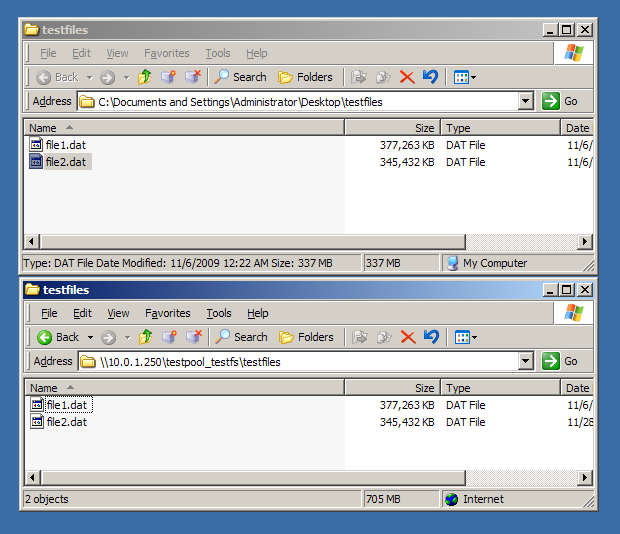
Copy two files to share by drag-and-drop in Finder, yank power to the server before second file finishes copying. After powering server back up, both files are there with correct (full) file size. The only hint that the second file might not be complete/correct is the timestamp, which was left at time of copy rather than time of original file. Of course, checksums differ between original copy on Windows box and the unfinished copy on server.


I understand that this behaviour is not OpenSolaris' fault. However it is undesireable: it is non-transactional, and a form of data corruption. If a connection to server is lost during a bulk transfer over CIFS, the user has to hunt down which file(s) might be incomplete and manually check/delete them. A backup solution which compares file size and date might fail, it would need to checksum all files or have "date inversion -> recopy" logic (and I do not know whether the timestamp is 100% reliable as an indicator of incomplete write) If a user is prompted "do you wish to overwrite file size 123456 with older version size 123456" they will likely decline, leaving the copy on server incorrect.

I also understand that this situation can be avoided: only write files using a utility which write to tmp file then renames, for instance. However it would increase the value of OS as a storage appliance to be as bulletproof as possible to *any* use by Windows users.

Ideally, incomplete files should never have full file size. This would allow any dumb or manual backup process to detect the incompleteness. For instance, right click->properties on a parent folder would show a difference in size vs original, indicating that the data within is not complete. Basic filesize comparison would trigger a recopy without relying on more esoteric properties such as timestamp.

Is there any currently available method to mitigate this from the OS side? eg

1. Making sure that file sizes will always reflect the amount of data written
2. CIFS option to implement file writes as tmp->rename... this way incomplete files appear to be missing (although without 1. some methods, eg checking size of parent folder, would still mislead users)
3. Some method to remove file completely if write did not complete, perhaps relying on ZIL mechanism so it can be applied at startup after server crash.

Failing that, is there any one-time configuration to a Windows machine to change any of its behaviours to increase robustness?

I am not familiar with the details of CIFS and how various versions of windows handle file copy/move. It is likely that the suggestions above are impossible or don't make sense. However finding a way to make sure that incomplete file/batch copies are immediately detectable would make OS more robust as a storage appliance.

Pointers from those in the know about what can and can't currently be done, what a future solution might look like, or why the above is totally wrong-headed are appreciated.